
How to Upsell Digital Images Without Being Pushy
Intro: Why gentle upselling works for photographers
Quick scenario: a non-pushy upsell that increased average sale
A single, unobtrusive suggestion in a client-first gallery turned a 3-image order into a 15-image purchase for a wedding client. You present the images, highlight her favorites, and offer an easy upgrade—no hard sell, just clear options inside the client gallery. Using subtle calls-to-action inside your proofing platform and thoughtful soft sell techniques makes the difference between ignored add-ons and accepted upgrades.
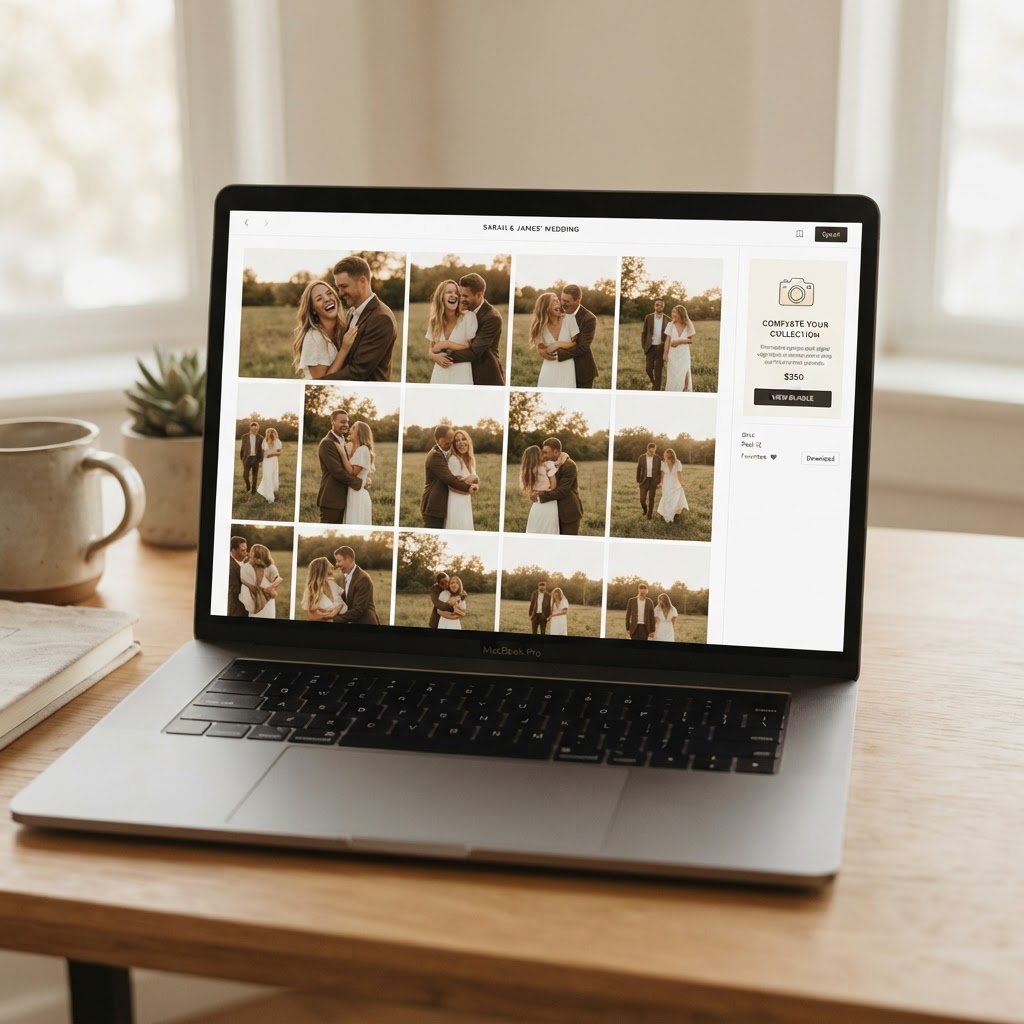
Sell the outcome, not the file: position digital images as the solution to a desire (sharing, gifts, prints) and clients buy because it helps them, not because you pushed a product.
Why photographers worry about sounding pushy (and why it’s avoidable)
You worry about sounding pushy because trust and timing drive repeat business. Pushy language breaks rapport and creates buyer's remorse, but that’s avoidable with simple framing. Use your proofing platform to present choices, bundle options for clarity, and label pricing so clients see value before you ask. Smart use of photo proofing tools turns upsells into helpful suggestions, not pressure.
What you’ll get from this article: scripts, pricing, and workflows
You’ll get ready-to-use scripts, practical pricing examples, and step-by-step workflows you can copy into your client galleries. Expect:
- Short email and gallery copy you can paste now.
- Pricing templates for pricing digital images and bundles that convert.
- Proofing workflows for automated reminders and gallery prompts.
You’ll leave with concrete ways to start selling digital photos and running gentle photo upsells. By the end you’ll know how to upsell digital images without alienating clients—small changes that boost revenue and keep relationships strong.
Understand why clients buy (so you can offer what they want)
Knowing why clients buy makes selling digital photos feel natural and keeps your offers relevant, not pushy. Tailor your options to emotional drivers and practical needs so your photo upsells feel like solutions, not sales pitches.
Buyer psychology: choices, perceived value, and ownership
Too many choices overwhelm buyers; simplify options to guide decisions. Present 2–3 curated packages or a base product with a clear upgrade so clients choose quickly and confidently.
Value drives decisions more than features, so highlight benefits over specs. Emphasize how an image will be enjoyed or displayed to boost perceived value and reduce sticker shock.
People pay for feeling something and for certainty they can use the files. Reinforce the idea of possession—downloads, prints, or framed art—to increase the appeal of ownership.
People buy memories and confidence first; make it obvious how the purchase delivers both and you’ll convert more without pressure.
Common client priorities: memories, ease, use rights
Clients usually prioritize preservation, convenience, and clarity about use rights. Speak to these priorities when you price and package.
- Preservation: They want to keep moments intact for family and future generations.
- Convenience: They want an easy experience—fast delivery and clear downloads via client galleries.
- Use rights: They need to know what they can print or share, so state licensing plainly.
- Cost clarity: Transparent pricing prevents sticker shock when discussing pricing digital images or add-ons.
How to ask discovery questions that uncover purchase triggers
Ask short, open questions at the right moments—during consults, at delivery, or in your gallery messages. Keep questions focused and empathetic.
- Start with context: “How do you plan to use these photos—prints, albums, or social?”
- Uncover emotion: “Which shot would mean the most to you a year from now?”
- Clarify logistics: “Do you want high-res files for large prints or just web-sized images?”
- Offer options that match: “If you care about ease, we can add a print package to your gallery.”
Use these answers to suggest relevant photo upsells and soft sell techniques—frame upgrades as solutions, not extras, and let your photo proofing tools do the heavy lifting.
Package and price digital images to make buying a no-brainer
Tiered/anchored pricing examples photographers can copy
Use a clear 3-tier menu that makes the middle option irresistible. Set an aspirational high anchor, a well-equipped mid option, and a budget starter so clients pick the best value without pressure.
A simple example most clients understand:
- Premium — $350: full session, 50 edited images, extended licensing, print credit.
- Most Popular — $200: full session, 25 edited images, web/social license.
- Starter — $99: mini session, 5 edited images, personal web use.
Keep descriptions short and benefits front-loaded (what they get, why it matters). Label the middle plan “Most Popular” and spotlight it visually in your client galleries to nudge decisions without hard selling.
Position a clear high-value anchor so the mid-tier becomes the automatic, comfortable upgrade.
Smart bundles: sessions, must-haves, and add-on images
Bundle the session with must-haves to increase perceived value and remove decision friction. Offer a core bundle that covers the most common client needs, then sell add-on images in small, affordable increments.
Use a small set of predictable add-ons clients expect:
- Extra edited image packs (5 or 10 photos)
- Print credits or mount options
- Rush editing or expanded licensing
Price add-on image packs so each additional file seems like a bargain compared to the per-image a la carte rate. Promote the bundle first in your proofing gallery and present add-ons as simple choices rather than upsells.
Clear licensing and use explanations to remove doubt
State the license plainly at checkout so clients won't hesitate to buy. Break it into three short lines: permitted personal uses, social/web use, and optional commercial or extended use for a fee.
Use your photo proofing tools and client galleries to show a one-line license reminder beside each download button. Typical licensing options to display:
- Personal use (included)
- Prints & albums (included)
- Commercial use (additional fee)
When pricing digital images, this clarity prevents follow-up questions and turns curiosity into confident purchases using gentle, trust-building soft sell techniques.
Soft-sell language and scripts that actually convert
Lead with benefits and outcomes, not features
Lead every line with what the client gains, not the file specs. Clients book emotion-first: sell the moment, not the megapixels.
Focus on outcomes like prints that last, easy sharing and relaxed viewing in their client galleries.
Use short, benefit-led phrases like:
- "You’ll have high-resolution files for wall prints that last generations."
- "This makes sharing with family effortless—no resizing or guesswork."
- "Keeps your memories organized in one easy-to-use gallery."
The easiest way to increase add-ons: describe the emotional outcome first, then mention the product that delivers it.
Three short scripts: booking, delivery, follow-up
Use concise, friendly lines that put the client first—these show exactly how to upsell digital images without pressure.
- Booking: "Many couples add a small digital collection so they can share images with family right after the day—would you like me to reserve that option for you?"
- Delivery: "I’ve uploaded a curated gallery for you; if you want full-resolution downloads for prints, I can add a digital package to your order—no rush to decide."
- Follow-up: "Loved editing these—would you like help choosing a few images for prints or a full digital set to keep everything together?"
Keep each script adaptable: swap “couples” for “families” or “seniors” depending on session type.
How to handle common objections kindly and confidently
Acknowledge concerns quickly, then offer a simple, client-centered option. Use these short responses when you hear resistance.
- "It’s expensive": "I get that—many clients start with the curated set, then add full access later. I can hold a bundle price for 48 hours if that helps."
- "I don't need all of them": "Totally fair—grab a favorites bundle now and upgrade to the full set anytime in your gallery."
- "How do downloads work?": "You’ll get instant access via our proofing link; the files are print-ready and I’m happy to recommend labs."
Mention your soft sell approach and clear pricing digital images options in conversations and on your gallery pages. This keeps selling digital photos easy, client-centered, and low-pressure.
Timing: when to present upsells during the client journey
Present upsells at moments that feel helpful, not salesy. Map offers to natural touchpoints so clients see value instead of pressure.
During booking vs during shoot vs during delivery — pros and cons
Presenting upsells at booking gives clients time to consider upgrades before the session and sets expectations early. Booking-stage offers work well for add-ons like extra digital images or extended galleries, but clients can feel overloaded if you bundle too many choices upfront.
Offering upsells during the shoot captures enthusiasm and lets you demo ideas in real time. On-session suggestions (extra outfit shots, a quick family combo) convert because clients are emotionally engaged, though logistics and time constraints can limit uptake.
Promoting upsells at delivery targets buyers when they see finished work and are most likely to purchase. Delivery-stage offers in your client galleries convert high because the product is tangible, but delayed outreach risks missed momentum.
- Booking: good for planning, low pressure, lower conversion rate
- Shoot: high emotion, immediate decisions, logistical limits
- Delivery: highest conversion, ideal for digital image upsells, needs timely follow-up
Presenting a well-timed, concrete upgrade when the client sees results (not just hears about them) boosts conversions more than any scripted pitch.
Use previews, sneak peeks, and favorites to create momentum
Lead with visual proof: send sneak peeks or a favorites slideshow to build desire before you ask for the sale. Short, curated previews make the value obvious and set the stage for a soft upsell.
Use your photo proofing tools to surface favorites and let clients heart or comment on images. Engagement data signals who’s most likely to buy and which images to feature in upsell emails or SMS.
- Send 3–6 sneak peeks within 24–48 hours
- Highlight top favorites in the client gallery
- Offer an easy one-click add to cart for digital images

Follow-up windows, gentle reminders, and limited-time incentives
Follow up while enthusiasm is high using timed, respectful nudges. Send a first delivery message, then a gentle reminder at 48–72 hours, and a final limited-time incentive at about 7–10 days to create urgency without pressure.
Automate reminders through your proofing platform but keep tone personal and helpful. Use subject lines that spotlight value (“Your favorites are ready — extra images available”) and include an obvious CTA inside the gallery.
- Immediate: preview + purchase link (within 24–48 hours)
- Reminder: social proof or testimonial + nudge (48–72 hours)
- Final incentive: small, time-limited discount (7–10 days)
Timing sells—match your offer to the workflow moment, and the upsell will feel like a natural next step, not a hard sell.
Use proofing tools and gentle nudges to automate upsells
Design proofing galleries that highlight must-have images
Lead with an "Essentials" strip so clients see the best images first. Put a small curated collection at the top of your client galleries and label it clearly (e.g., "Top 10 Moments"); clients often buy the first images they emotionally connect with.
Use visual signals—badges, subtle price tags, and mockups—to draw attention without pressure.
Helpful gallery elements to include:
- Hero row of 8–12 must-haves
- "Client favorites" based on selections
- Quick-view mockups (prints, albums, frames)
Create an "Essentials" strip of 8–12 hero images at the top of every gallery—clients buy what they see first, so make that area your soft upsell.
CTA best practices for galleries and emails
Use concise, benefit-led CTAs that remove friction and highlight value. Place the primary CTA near the top of the gallery and again after the hero strip so it’s always visible.
Words that convert: “Add favorites to collection,” “Download high-res files,” “Build your keepsake set.” Keep buttons large, mobile-friendly, and action-specific.
Track behavior
Track views, favorites, cart adds, and email opens to know who’s close to buying. Use those signals to trigger next steps—high views + favorites = upsell opportunity.
Monitor these metrics:
- Gallery views per image
- Number of favorites per client
- Cart abandonment rate
- Email open/click-through rates
A/B test offers
Run simple A/B tests to learn what converts, then scale winners. Test one variable at a time—price, CTA wording, or hero image mix—and run for a set sample size (min. 50 galleries or 2–4 weeks).
A quick testing plan:
- Pick one variable (price, CTA, thumbnail).
- Split similar clients evenly.
- Compare conversion and average order value.
Automate polite reminders
Send behavior-triggered, friendly follow-ups instead of manual chasing; use your proofing tool to automate them. Trigger sequences: 48-hour nudge after gallery view with favorites, 7-day reminder for carts, and a final “limited-time” gentle prompt.
Keep language helpful: “Thought you’d like these favorites—want me to set them aside?” and always include an easy opt-out.
Practical examples: scripts, price sheets, and gallery CTAs
Sample 3-tier price sheet for digital-image buyers
Lead with a clear, simple 3-tier option to remove decision fatigue.
- Basic — $49: 5 high-res downloads, web sharing license.
- Popular — $199: All edited images from session, full print + social license.
- All Images — $349: All edited images + extended commercial license + priority album prep.
Front-load benefits next to prices so clients see value immediately. Use pricing digital images language that emphasizes what they get, not what you charge.
The easiest upsell is the one the client can understand in one glance: clear price, clear deliverable, clear benefit.
Email and in-gallery script templates (short, medium, long)
Use these scripts in client galleries and follow-up emails to apply soft sell techniques. These examples help with selling digital photos without pressure and work well with your photo proofing tools.
- Short (in-gallery badge): "Love these? Get all edited images for $199 — add to cart."
- Medium (gallery banner/email): "You picked some favorites — upgrade to the Popular package for full-res downloads of every edited image and sharing rights. Click to view upgrade options."
- Long (follow-up email): "Thanks again for letting me capture your day. Many clients find the full digital package the easiest way to save every moment — you’ll get high-res files, print-ready images, and a license for personal use. Want me to reserve the All Images package for you while it’s available?"
Start with permission language, state the benefit, end with a single clear action.
Example CTAs and microcopy that increase clicks
Use direct, benefit-led CTAs in client galleries to nudge without nagging. Test these phrases in your client galleries and proofing tools.
- "Download Favorites" — gentle, non-committal.
- "Get the Full Set — $199" — transparent and action-oriented.
- "Save All Images to Library" — speaks to long-term value.
- "Try High-Res Samples" — lowers the friction to buy.
Keep microcopy under 6 words, action-first, and pair CTAs with a one-line subtext (e.g., "Includes web + print license"). These tiny nudges convert more than hard sells.
Conclusion: Sell more without selling out (next steps + soft CTA)
You can increase revenue while keeping your client experience warm and authentic. Now you know how to upsell digital images in a way that feels helpful, not pushy. If you want a low-effort test, try proofing with like.photos — clients tap favorites and you get exact filenames.
Quick checklist: three actions to try this week
- Lead with choice. Add a focused upsell option in your client gallery (one clear add-on) and mention it in your delivery message.
- Nudge with value, not urgency. Send a soft reminder showing favorites and a suggested edit or print, letting the images sell themselves.
- Make the buy path tiny. Reduce clicks: clear price, one-click add-to-cart, and a visible sample to remove friction.
Focus on tiny, measurable changes: offer one simple upsell, show favorites, and make buying one click — that’s where most photographers see results fast.
Measure results and iterate: what to track
Start with the numbers that show real behavior. Track these metrics weekly to learn fast and improve your approach:
- Favorites-to-purchase percentage (your best early signal of intent).
- Conversion rate on the gallery CTA (how many clients actually buy).
- Average order value (are clients choosing bundles or singles?).
- Time from gallery delivery to purchase (optimize your reminder timing).
- Engagement per gallery (views, favorites, and repeat visits).
Use small experiments: change one variable at a time (price, language, reminder timing) and compare results.
Try proofing with like.photos to test gentle upsells — fast setup, focused on quick client selection
Get a test gallery live in under 10 minutes. Upload a shoot, enable favorites, and send the share link to one recent client for feedback.
Start with a single upsell option visible in the gallery (digital single or bundle). Monitor favorites and purchases for the week, then tweak pricing or wording based on what moved.
Concrete takeaway: implement the 3 actions above, track a couple of metrics, and iterate — small, consistent changes grow revenue without compromising your brand.